


SellCarAdvisor is reader-supported, when you sign up through links on this post, we may receive compensation at no extra cost to you. How We Work.
The bottom line: Taking great photos of your car can add hundreds or thousands to your selling price.
The 25 tips are organized into 5 phases: preparation, camera settings, angles, shot list, and advanced technique. You don’t need fancy equipment or photography experience to follow them.
Master the first 15 and you’ll have photos that sell cars fast. The final 10 are advanced moves that will make your listing stand out from thousands of others. Before you list, you can also compare offers from multiple services with Sell Car Advisor to see what your car is actually worth.
Key Takeaways
- Cleaning your car is the single most important step. A dirty car kills buyer interest before they even read your description.
- Shoot during golden hour (about 1 hour before sunset) or on overcast days for natural, flattering light that makes paint look its best.
- Stand at least 10 paces back and zoom in. Getting too close creates wide-angle distortion that makes your car look wrong.
- The front three-quarter angle is the most important shot. Position yourself 45 degrees from the front corner to show both the front and side at once.
- Show damage honestly. Buyers who find hidden problems at pickup will walk away or push for a lower price.
- Use as many photos as the platform allows. Most listing sites allow 15 to 30 photos, and more photos build buyer trust.

Automated assistant — general info, not legal advice
Answers come from our state paperwork data and published guides. Confirm anything binding with your state DMV.
Compare Instant Offers





Phase 1: Pre-Shoot Preparation
Tip 1: Clean Your Car Inside and Out
This is your most important step. A dirty car looks uncared for, and no amount of good photography can fix that first impression. You only get one chance to make buyers trust what they’re seeing.
Exterior cleaning:
- Wash and wax the entire car
- Clean wheels and tires until they shine
- Remove any stickers or temporary items
- Clean all glass surfaces inside and out
Interior preparation:
- Vacuum thoroughly, including seats and carpets
- Wipe down dashboard, console, and door panels
- Remove personal items, chargers, and clutter
Engine bay and details:
- Clean engine bay if it’s in good condition
- Ensure all fluids are topped off
- Clean any chrome or metal trim pieces
A professional detail might be worth the investment if your car needs serious cleaning. The cost often pays for itself in higher selling prices.
Learn more: How to Clean Your Car at Home Before Selling
Tip 2: Choose the Right Time for Perfect Lighting
Lighting makes or breaks car photos. The wrong light can make even a beautiful car look dull and unappealing.
Best times to shoot:
- Golden hour: The approximately 60 minutes before sunset gives warm, directional light that flatters any paint color
- Cloudy days: Overcast skies act like a giant softbox, creating even, flattering light
- Early morning: Similar to golden hour, but requires getting up early
Times to avoid:
- Midday sun: Creates harsh shadows and excessive glare
- Very low light: Results in grainy, blurry photos
- Mixed lighting: Half sun, half shade creates uneven exposure
If you must shoot during harsh daylight, find shade from buildings or trees to create more even lighting across the entire car.
Tip 3: Find the Perfect Location and Background
Your background should complement your car, not compete with it. The goal is to make your car the star of every photo.
Best backgrounds:
- Empty parking lots with clean pavement
- Plain walls or buildings
- Open areas with minimal distractions
- Industrial areas with clean, modern architecture
Surfaces that work:
- Concrete or asphalt (shows reflections nicely)
- Clean gravel
- Smooth dirt or sand
Avoid these locations:
- Grass (looks cheap and shows dirt easily)
- Busy parking lots with other cars
- Areas with power lines, signs, or clutter
- Your driveway (unless it’s exceptionally clean and spacious)
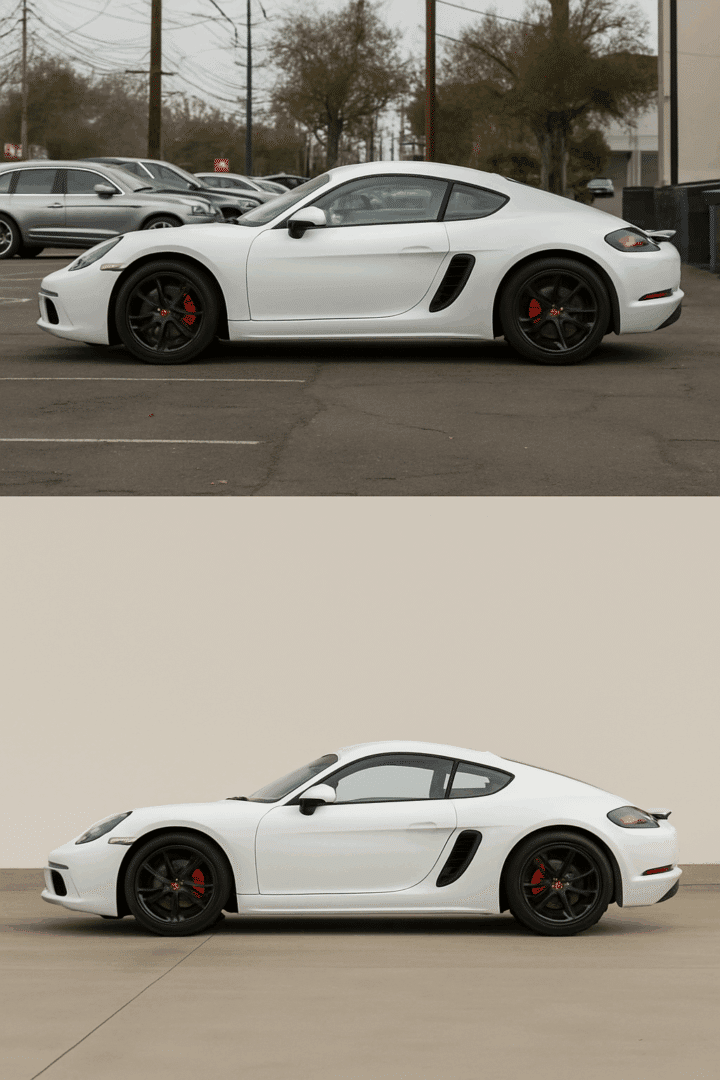
Which car would you rather buy? The top photo makes you focus on everything except the car itself. The bottom photo makes the car the star of the show.
Scout locations in advance. What looks pleasing to your eye might have distracting elements that show up in photos.
A note on lifestyle backgrounds: Some sellers wonder if scenic backgrounds (such as mountain roads, beaches, or upscale areas) help buyers envision ownership.
While this works for car advertisements, it typically backfires when selling your personal vehicle. Buyers spending their own money want to see the product clearly, not an aspirational scenery.
Save scenic shots for 1 to 2 bonus photos, but make your main listing photos clean and focused.
Tip 4: Stand Back and Use Zoom to Avoid Distortion
This tip alone will dramatically improve your photos. Getting too close to your car creates an unflattering distortion that makes proportions look wrong.
The 10-pace rule:
- Walk at least 10 steps away from your car
- Use your camera’s zoom to fill the frame
- This “flattens” the image and shows true proportions
Why distance matters:
- Close shots make the front of the car look huge compared to the back
- Wide-angle distortion makes cars look stretched or warped
- Telephoto compression from a distance makes cars look more natural
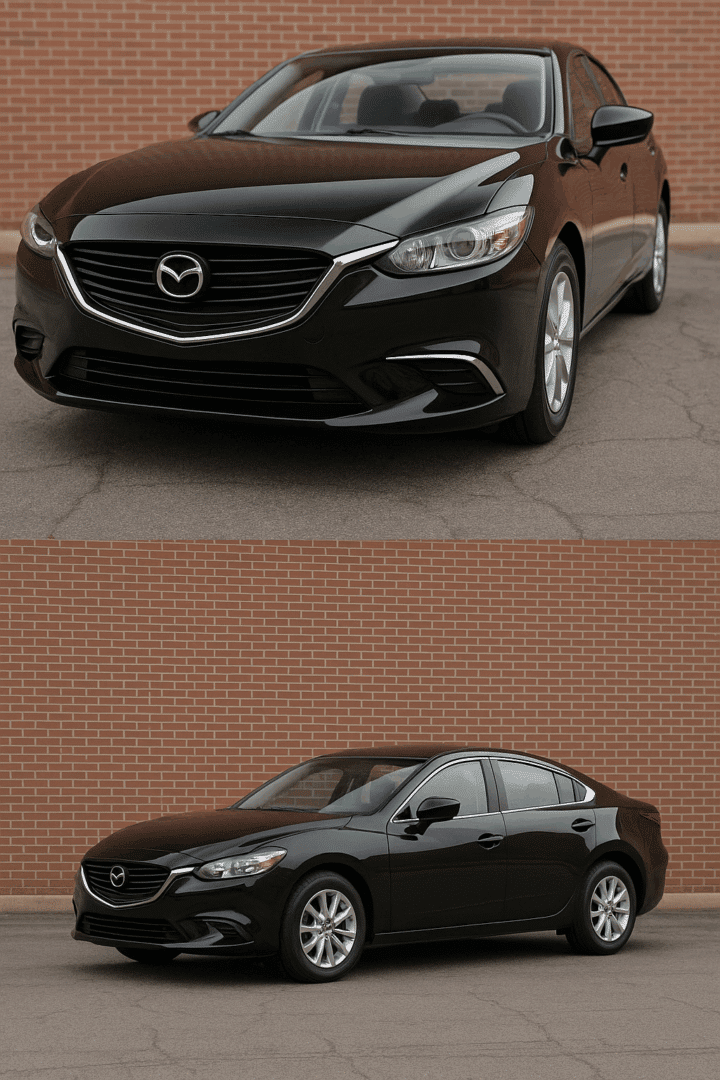
The top photo makes the car look weird and unnatural, like a funhouse mirror. The bottom photo shows the car as it really looks, with proper proportions that buyers can trust.
Tip 5: Always Shoot in Landscape (Horizontal) Mode
Auto websites, car dealers, and buyers expect horizontal photos. This isn’t just preference, it’s how cars are meant to be displayed.
Why landscape orientation works:
- Shows the full width and length of the car
- Matches how our eyes naturally see vehicles
- Fits website layouts and listings better
- Allows space around the car for context
When to use portrait mode:
- Social media posts (Instagram, Facebook)
- Tall detail shots (steering wheel, gear shifter)
- Vertical elements like open doors
Phase 2: Camera Settings and Basic Technique
Tip 6: Turn Off the Car and Headlights
Running engines create exhaust that can blur photos, and headlights create distracting reflections. Turn everything off before shooting. Daytime running lights (LEDs that can’t be turned off) are fine.
Tip 7: Shoot from Headlight/Mirror Height, Not Eye Level
Most people photograph cars from standing height, which looks boring. Crouch down to headlight or mirror level for more dynamic, professional-looking angles that highlight the car’s design.
Tip 8: Use Simple Camera Settings
- Smartphone users: Auto mode works great, or try Portrait mode for blurred backgrounds
- DSLR users: Shoot at f/8 to f/11 for sharp photos from front to back, keep ISO around 100 to 400, use shutter speeds of 1/60 or faster
Tip 9: Avoid Filters and Heavy Editing
Buyers want to see the real car, not an Instagram-filtered version. Over-saturated colors and heavy effects make photos look fake and reduce buyer trust.
Tip 10: Never Use Flash
Flash creates harsh, unnatural lighting and unflattering reflections. Natural light always looks better, even if it means waiting for better conditions.
Tip 11: Use a Tripod for Stability
Cars don’t move, so take advantage of that. A tripod removes camera shake, allowing you to use slower shutter speeds for better low-light performance.
Tip 12: Fill the Frame Properly
Leave some space around your car, but don’t waste frame space on empty areas. The car should fill most of the frame while still breathing room on all four sides.
Phase 3: Essential Angles and Creative Composition
Tip 13: Master the Front Three-Quarter View
This is the most important angle in car photography. Position yourself at roughly a 45-degree angle from the front corner of the car.
This angle shows both the front and side, capturing the car’s color and design most accurately.
Other essential angles:
- Rear three-quarter view (45 degrees from back corner)
- Pure side profile (directly from the side)
- Straight-on front and rear views
Tip 14: Turn the Wheels for a Dynamic Look
Straight wheels look static and boring. Turn the front wheels slightly away from the camera to show more of the rim and create a more dynamic, styled appearance.

Tip 15: Vary Your Heights
Don’t shoot everything from the same height. Try ground-level shots for dramatic effect, elevated angles to show the car’s size, and different perspectives to keep your photo set interesting.
Or tilt your camera just a few degrees clockwise or counterclockwise to add a cinematic quality to your shots. This works well for sports cars or performance vehicles.
Phase 4: Complete Shot List – What to Photograph?
Tip 16: Take Interior Photos Properly
Interior shots sell cars as much as exterior photos. Buyers want to see where they’ll spend their time.
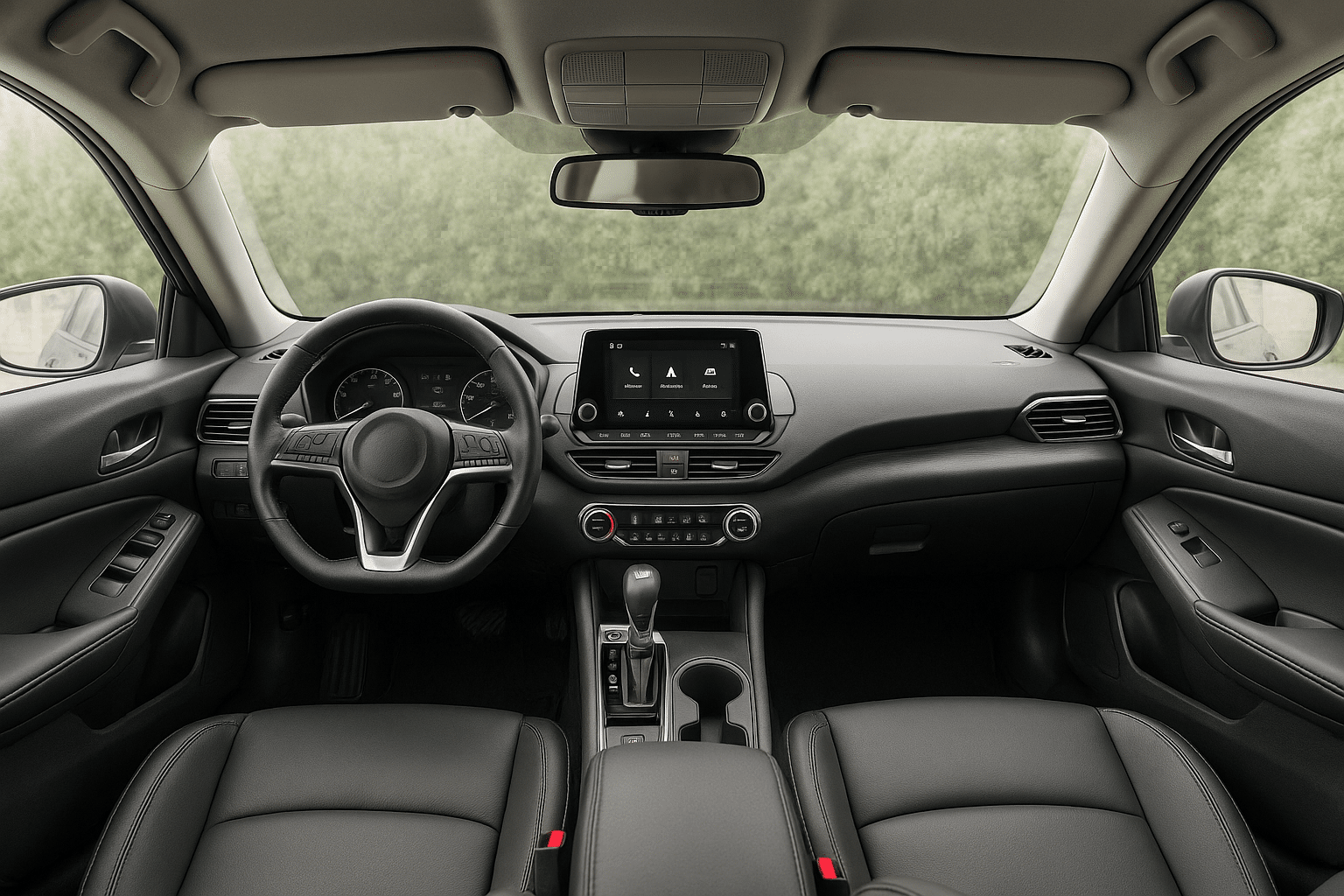
Interior setup:
- Turn car to accessory mode (lights on, engine off)
- Center the steering wheel
- Point all air vents in the same direction
- Put touchscreen on home screen
- Move front seats back and recline slightly
- Turn off overhead lights for even lighting
Best interior angles:
- Dashboard view from back seat
- Driver’s view (steering wheel and gauges)
- Rear seat view
- Cargo area/trunk
Tip 17: Show Damage Honestly
Hiding damage destroys buyer trust and wastes everyone’s time. Photograph any scratches, dents, or wear clearly.

Tip 18: Cover All Key Areas
Exterior must-haves:
- All four wheels and tires
- Front and rear bumpers
- Both sides
- Roof (if accessible)
- Engine bay
Interior essentials:
- Dashboard and controls
- All seating positions
- Trunk/cargo area
- Any special features
Tip 19: Capture Important Detail Shots
Detail shots differentiate your car from others and highlight special features buyers care about.
Details that sell cars:
- Leather seats or premium materials
- Technology features (touchscreen, navigation)
- Performance elements (sport wheels, badges)
- Maintenance indicators (recent tires, clean engine)
- Luxury touches (wood trim, premium sound system)
- Service records or owner’s manual. A photo of a folder of receipts tells buyers more about how the car was cared for than almost any other shot
Tip 20: Take Lots of Photos
Take multiple shots of each angle and pick the best ones later. Most selling platforms allow 15 to 30 photos, so use them all.
More photos show you have nothing to hide and give buyers confidence in their purchase decision.
Phase 5: Advanced Techniques for Standing Out
Tip 21: Use Panning for Motion Shots
If you want to show your car “in action,” try panning shots. Use a shutter speed of around 1/30 second and follow the car with your camera as someone drives by slowly.
This keeps the car sharp while blurring the background to show movement. Skip this for everyday cars, it works best for sports cars and enthusiast listings where performance is a selling point.
Tip 22: Control Reflections with a Polarizing Filter
A circular polarizing filter cuts reflections on paint and glass, making colors more saturated and details clearer. Rotate the filter while looking through your viewfinder to see the effect.
Tip 23: Try Light Painting Technique
For dramatic nighttime shots, use a flashlight or LED light to “paint” light across your car during a long exposure (15 to 30 seconds). This creates striking images that highlight curves and details.
It’s a cool technique, but keep it to 1 bonus shot at most. For most used car listings, clean daytime photos will do more work than dramatic nighttime art.
Tip 24: Avoid Shadows and Reflections
Watch for your own shadow in the frame. Also check for unwanted reflections of yourself or distracting objects in the car’s paint and glass.
Tip 25: Keep Post-Processing Simple
Basic adjustments are fine: slightly adjust brightness, contrast, and straightening. Avoid dramatic changes that make the car look different from reality.
Safe editing:
- Straighten horizons
- Adjust exposure slightly
- Crop for better composition
- Remove small distractions (trash, etc.)
Avoid:
- Changing car colors
- Heavy filters or effects
- Over-sharpening
- Removing significant damage
Equipment Recommendations
Smartphone Photography: Any smartphone from the last 3 to 4 years will take excellent car photos. iPhones and higher-end Android phones have multiple lenses and advanced features that rival dedicated cameras.
DSLR/Mirrorless Cameras: If you own a “real” camera, use it. Don’t feel the need to buy one just for selling your car. A 50mm lens (or 35mm on crop sensors) works great for most car photography.
Essential Accessories:
- Tripod: Even a basic $20 tripod dramatically improves photo quality
- Circular Polarizing Filter: Reduces reflections and improves colors
- Remote Shutter: Avoids camera shake and lets you get in position
Budget-Friendly Options: Phone tripod mounts, basic reflectors, and cleaning supplies will cover 90% of what you need for under $50.
Common Mistakes to Avoid
Top 10 mistakes that hurt car sales:
- Dirty car: Nothing kills a sale faster than dirt and clutter
- Bad lighting: Harsh shadows or insufficient light
- Too close: Distorted proportions from shooting too near
- Cluttered background: Distracting elements that take focus off the car
- Wrong orientation: Portrait mode when landscape would be better
- Missing key angles: Not showing all sides of the car
- Hidden damage: Trying to hide problems instead of showing them honestly
- Flash photography: Harsh, unnatural lighting
- Tilted horizons: Makes photos look unprofessional
- Over-editing: Making the car look unrealistic
Quick fixes:
- Always clean first
- Shoot during better light
- Move farther back
- Find simpler backgrounds
- Take more angles
- Be honest about the condition
Editing and Post-Processing Guidelines
Basic adjustments only:
- Straighten crooked photos
- Adjust brightness and contrast slightly
- Crop for better composition
- Remove small distractions
What to avoid:
- Color changes that misrepresent the car
- Heavy filters or effects
- Removing damage or significant wear
- Over-sharpening that creates halos
- HDR effects that look unrealistic
Mobile apps that work well:
- Snapseed (free, powerful)
- VSCO (good presets)
- Lightroom Mobile (subscription, professional)
Desktop software:
- Lightroom (subscription, industry standard)
- Luminar (one-time purchase)
- Free alternatives: GIMP, Photos app editing
Buyers want to see the real car, not a heavily edited version.
Creating Your Final Photo Set
How to organize and select:
- Review all photos on a larger screen (computer vs phone)
- Pick the clearest, best-lit shot of each angle
- Include at least one photo showing any damage
- Choose detail shots that highlight your car’s best features
- Arrange photos in logical order (exterior, then interior, then details)
Optimal number of photos:
- Minimum: 8 to 10 photos covering all essential angles
- Recommended: 15 to 20 photos for complete coverage
- Maximum: Most platforms allow 25 to 30 photos, use them all
Photo order for your car listing:
- Best overall exterior shot (front three-quarter)
- Front view
- Rear three-quarter view
- Side profiles (both sides)
- Interior shots (dashboard, seats, cargo)
- Engine bay
- Detail shots (wheels, features, technology)
- Any damage photos (be upfront)
Platform considerations:
- eBay Motors: Allows many photos, use them all
- Craigslist: Limited photos, choose your best
- Autotrader/Cars.com: Professional platforms, quality matters
- Facebook Marketplace: Mobile-first, make sure photos look good on phones
Compare Instant Offers
Compare Instant Offers
Frequently Asked Questions
Do I need an expensive camera to take good car photos?
No. Any smartphone from the last few years can take excellent car photos. The most important factors are cleaning your car, finding good light, and following proper technique.
A $1,000 camera won’t help if you shoot a dirty car in bad light.
What’s the best time of day to photograph my car?
The hour before sunset is ideal, or any overcast day. Avoid shooting in harsh midday sun, which creates unflattering shadows and excessive glare. Early morning works too, but requires getting up early.
Should I hire a professional photographer?
For most car sales, it’s not necessary if you follow these tips. If you’re selling a high-end vehicle worth $50,000 or more, professional photos might pay for themselves in higher selling prices and faster sales.
How many photos should I include in my car listing?
Use as many as the platform allows, typically 15 to 30 photos. More photos show transparency and give buyers confidence. Include every angle, the interior, engine bay, and any damage or special features.
Learn more: Best Sites to Sell Your Used Car Online – see which platforms work best for your car type
What camera settings should I use on my phone?
Auto mode works great for most situations. Try Portrait mode for blurred backgrounds. Turn off flash, shoot in landscape orientation, and use the zoom feature instead of moving closer to your car.
How do I photograph a black or dark-colored car?
Dark cars need good lighting to avoid looking like a black blob. Overcast days work well for dark cars.
Avoid harsh sunlight, and consider using a polarizing filter to reduce reflections and show off the paint depth.
What backgrounds work best for car photography?
Simple, clean backgrounds that don’t compete with your car. Empty parking lots, plain building walls, or open areas work well. Avoid areas with grass, busy locations, or anywhere with lots of distracting elements.
Should I show damage and imperfections in photos?
Yes. Hiding damage destroys buyer trust and wastes everyone’s time. Buyers who find undisclosed problems at pickup may walk away or ask for a lower price.
Can I edit my car photos or should they be natural?
Light editing is fine. Straightening, slight exposure adjustments, and cropping improve photos without misrepresenting your car.
Avoid heavy filters, color changes, or anything that makes the car look different from reality.
What’s the difference between landscape and portrait orientation for car photos?
Landscape (horizontal) orientation is standard for car sales because it shows the full width and length of vehicles. Portrait (vertical) orientation crops off parts of the car and doesn’t fit most website layouts.
How far should I stand from my car when taking photos?
At least 10 paces away, then use zoom to fill the frame. This prevents distortion that makes proportions look wrong. Standing too close with a wide-angle lens makes the front of the car look huge compared to the back.
Do I need special equipment like tripods or filters?
A basic tripod helps and costs under $30. A circular polarizing filter reduces reflections and improves colors, but it isn’t required. Your phone and good technique will handle 90% of what you need.
What angles are most important when selling a car?
The front three-quarter view is most important because it shows both the front and side in one shot. Also key: the rear three-quarter view, side profiles, interior dashboard shot, and engine bay if it’s clean.
How do I avoid reflections on the car’s surface?
Cars are naturally reflective, so you can’t eliminate all reflections. Control them by choosing your background carefully and using a polarizing filter if available. Avoid wearing bright clothing that will show up in the paint.
Should I clean my car before every photo session?
Yes, especially if conditions have changed since your last cleaning. Even light dust or water spots will show in photos. A quick wipe-down takes 15 minutes but can save you from having to reshoot everything.

Article Update History
These tips hold up because good light, clean backgrounds, and honest photos have always been what buyers respond to. We reviewed and updated every tip to make sure nothing here is outdated or misleading.
Originally posted and shared with our readers.
